
Where Exactly Is the NotebookLM Watermark? Position and Size
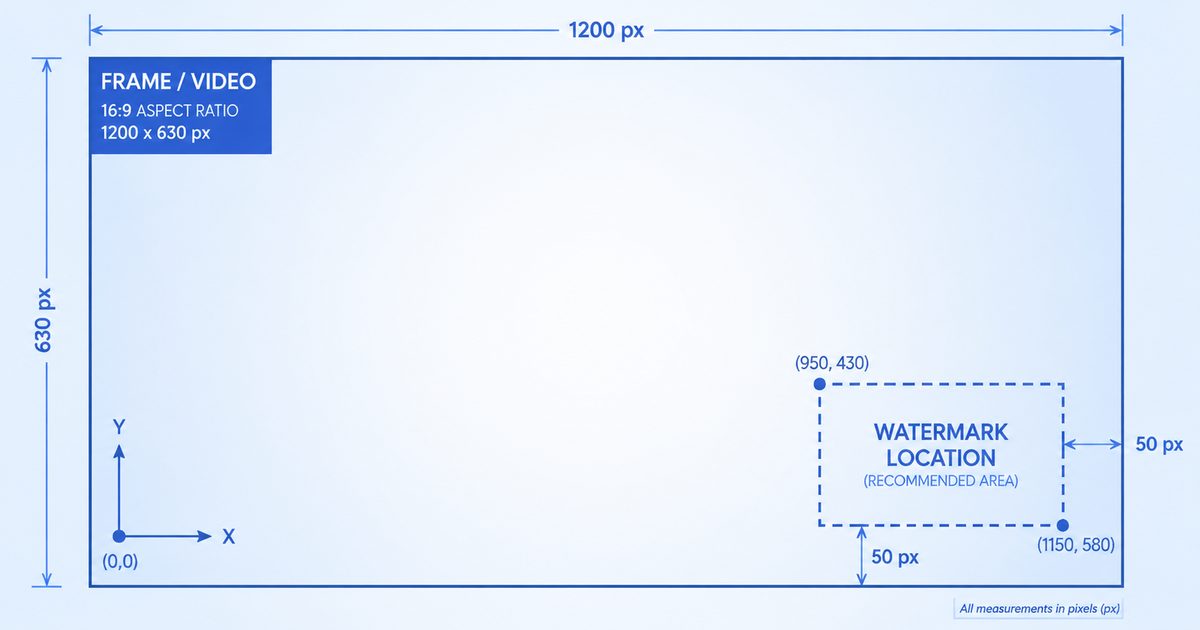
A Technical Map of Every NotebookLM Watermark
The NotebookLM watermark isn't in the same place — or even the same form — across export formats. In a video it's a logo overlay; in a PDF it's a text badge; in a Gemini image it's a sparkle glyph. If you're trying to remove it manually, or just curious how automated tools find it, this is a complete reference for where the watermark sits and how big it is in each format.
One thing is consistent across all formats: the watermark lives in the bottom-right corner. Everything else — exact coordinates, size, how it's embedded — varies. Let's go format by format.
Video Overviews
In NotebookLM 1080p video, the watermark logo sits at x=1104, y=656 measuring 770×62 px; in 720p video it sits at x=736, y=437 measuring 513×41 px — always bottom-right. A separate "Made with Google" end card fills the final 2.5 seconds. Both are removed via FFmpeg delogo plus tail trim.
NotebookLM video exports carry two watermark elements:
- A persistent logo overlay in the bottom-right corner, visible throughout the video
- A "Made with Google" end card filling the final 2.5 seconds
The logo overlay sits at fixed pixel coordinates that depend on the video resolution:
| Resolution | X, Y (top-left of watermark) | Width × Height |
|---|---|---|
| 1080p (1920×1080) | x = 1104, y = 656 | 770 × 62 px |
| 720p (1280×720) | x = 736, y = 437 | 513 × 41 px |
Because these coordinates are fixed, the video watermark remover can apply FFmpeg's delogo filter precisely without you having to draw a box around it.
PDF Slides
When NotebookLM exports a slide deck as PDF, each page gets a small "NotebookLM" text badge in the bottom-right corner. Unlike video, the exact pixel position varies slightly with page dimensions and rendering scale, so removal tools detect it dynamically rather than relying on fixed coordinates.
The detection scans roughly the bottom-right 22% width × 8% height of each page, identifies the dark watermark text against the background, and removes it. Pages are rendered at 2x resolution before processing to preserve quality. You can run this on your own file with the PDF slides watermark remover.
PPTX Presentations
In PPTX files, the watermark is baked into the background image of each slide — it lives inside the ppt/media/ folder of the PPTX archive, not as a separate text box you can click and delete. It sits in the bottom-right of each slide image.
For NotebookLM's standard slide export resolution (1536×2752 or 2752×1536 depending on orientation), the watermark occupies a fixed region of roughly 216 × 44 px at the bottom-right. For other resolutions, it's located by connected-component detection. Drop your deck into the PPTX watermark remover to clean every slide, or see our PPTX removal guide for the full process.
Infographics
NotebookLM infographics are exported as PNG or JPG images with a "NotebookLM" text stamp in the bottom-right. The watermark detection here is adaptive:
- Scan region: bottom-right corner, sized relative to the image (about 22% of width, 8% of height, with sensible minimums)
- The tool estimates the background brightness, then isolates pixels significantly darker or lighter than the background (the watermark text)
- Connected components are grouped and filtered by size, aspect ratio, and vertical position to avoid false positives
- The detected region is filled with a vertical gradient sampled from the pixels directly above and below it
The infographic watermark remover runs this detection automatically in your browser.
Gemini Images
The Gemini image watermark is a four-pointed sparkle "✦" in the bottom-right corner. On images with a short side ≤1024px it measures 48×48 px with a 32px margin; on larger images it measures 96×96 px with a 64px margin. Because it uses alpha blending at known coordinates, it is removed losslessly via alpha reversal.
Gemini-generated images carry a different watermark entirely: a four-pointed sparkle "✦" in the bottom-right corner. Its size and margin depend on the image resolution:
| Image short side | Sparkle size | Margin (right, bottom) |
|---|---|---|
| ≤ 1024px | 48 × 48 px | 32px, 32px |
| > 1024px | 96 × 96 px | 64px, 64px |
Because the sparkle is applied with alpha blending at known coordinates, it can be removed losslessly via alpha reversal — a different and more precise technique than the gradient-fill used for text watermarks.
Quick Reference Table
| Format | Watermark type | Position | Removal method |
|---|---|---|---|
| Video | Logo overlay + end card | Fixed coords, bottom-right | delogo + trim |
| Text badge | Bottom-right, per page | Detect + gradient fill | |
| PPTX | Embedded image mark | Bottom-right, ~216×44px | Detect + gradient fill |
| Infographic | Text stamp | Bottom-right, adaptive | Detect + gradient fill |
| Gemini image | Sparkle ✦ | Bottom-right, 48 or 96px | Alpha reversal (lossless) |
Why Is It Always Bottom-Right?
The bottom-right corner is the conventional placement for branding watermarks across the industry — it's where the eye lands last when reading left-to-right, top-to-bottom, so it marks the content without dominating it. Google follows this convention consistently across NotebookLM and Gemini, which is exactly what makes automated removal reliable: the tool knows where to look.
Removing the Watermark
Now that you know where each watermark lives, removing it is one step. The NotebookLM Remover handles all five formats automatically — it detects your file type, locates the watermark using the logic above, and removes it entirely in your browser. No upload, no account, free.
Frequently Asked Questions
Can I remove the watermark by just cropping the bottom-right corner?
You could, but you'd lose real content and end up with non-standard dimensions — especially bad for video and slides where the watermark overlaps the frame. Targeted removal (delogo, gradient fill, or alpha reversal) cleans only the watermark while keeping the full image intact.
Do the video coordinates ever change?
Google has used consistent watermark coordinates since the Video Overviews launch. If they change, the removal tool is updated to match. Always remove the watermark from the original export — re-encoding or resizing first will throw off the coordinates.
Why does the Gemini sparkle use two different sizes?
Google scales the sparkle to the image resolution so it stays visually proportional — a 48px sparkle on small images, 96px on large ones. The removal tool detects which size applies from the image's short side and picks the matching alpha template.
Ready to remove your NotebookLM watermarks?
Try NotebookLM Remover — Free